

Both write checks the same way, as
@eval functions of a trace.
Test a change before it ships: decimalai.evaluate()
decimalai.evaluate() runs each case in a set through your agent once, runs your checks on each run’s trace, and reports the counts. Run it on the setup the agent serves today, then on a different prompt version or without a skill, and compare the two. Neither run changes what production serves. It needs DECIMAL_API_KEY. 5. Measure it walks through it on the tutorial’s order-support agent.
- Cases are a
.jsonlfile, a list of dicts, or adecimalai.Dataset. Each needs aninput, the message. A check reads the whole row, your own fields included, astrace.case. - The setup.
prompt_version=4runs every case on that saved prompt version.exclude_skills=["refund-policy"]leaves those skills out: they aren’t listed, andload_skillrefuses them. - The report.
print(report)shows each check’s counts, then the failed cases with links to their traces. A check that returnedNonefor a case isn’t counted for it, so6/6means six cases it applied to. A check that raised is an error on that case, never a skip. - The comparison.
candidate.compare(baseline)puts two reports of the same cases side by side, matched byid, with the cases whose outcome changed. It counts and doesn’t call a difference an effect: a few cases run once each can flip with nothing changed.
evaluate() fails closed. If DecimalAI can’t give the runs the setup you asked for (a prompt version or skill the agent doesn’t have, no API key, an outage), it raises decimalai.EvaluationNotApplied, naming what the agent has, rather than running on the served setup. Tracing has to be on: calling it inside an open agents.trace() raises, and a case run with OpenAI Agents tracing disabled is reported as not checked.
One run on another setup
The same overrides work on a single run, without a set of cases:- OpenAI Agents SDK
- Your own model calls (decimalai.agent_config)
agent_config()s for the OpenAI SDK, the Anthropic API and the others don’t take these overrides.
Write a check
A check is a function of one trace. The same function works inevaluate() and on production traces:
Sampling rate
On production traffic,@eval(name="expensive_llm_review", sampling_rate=0.1) runs an expensive check on 10% of traces. evaluate() ignores this and runs every check on every case.
TraceData fields
The LLM judges DecimalAI runs on the server read the same answer, up to its first 12,000 characters; a longer one is shown cut, with a note saying so.
Score production traces
A check on production traffic is one of three kinds: deterministic (a rule, instant and free), an LLM judge (a model scores the output), or custom (your own@eval function).
Checks attach through
decimalai.langchain.instrument(), not init(). The evals= and
builtin_evals= arguments are LangChain-only. On other frameworks, attach
evaluators on the server, run batch_eval(), or push scores
with decimalai.eval().Pre-built evaluators
DecimalAI ships 10 ready-to-use evaluators in two tiers.Deterministic evaluators (free)
LLM-as-judge evaluators
The LLM judges score production traces, not
evaluate() runs. A judge in your process needs
[evals], which can’t be installed beside the OpenAI Agents SDK. A judge on DecimalAI scores a
trace DecimalAI already has, and evaluate() sends each case’s trace only after its checks have
run. Under evaluate(), write checks as plain Python.Where an LLM judge runs
A judge in your process needs the extra:
[evals] brings litellm, which pins openai<3, so it can’t share an environment with [openai], [openai-agents] or [pydantic-ai], and it isn’t part of [all]. Keep the >=0.27 floor: without it, pip resolves that conflict by quietly installing an old decimalai.
Built-in checks (every trace, on the server)
DecimalAI runs 5 basic checks on every trace it receives, from any SDK or a barePOST /api/v1/traces, with nothing to configure and no cost:
A trace shows them as Built-in. If an SDK sends its own scores under these five names, the server’s replace them. They count toward a trace’s verdict only until a real grade arrives (see Verdicts).
Auto-scoring
To score an agent’s traffic on the server, attach evaluators to it: Add evaluator on the agent’s Evals tab, an empty cell of the coverage matrix, or the API below. Each enabled evaluator runs on every trace the agent sends, as it arrives. An evaluator with no agent runs on every agent’s traces. An evaluator starts from a template.GET /api/v1/evaluators/templates lists them:
When the allowance is used up, LLM-judge evaluators are skipped on incoming traces until the next month; nothing fails. Evaluators also score
evaluate()’s evaluation runs, and LLM judges on them count against the allowance.
"eval_type": "deterministic" with a template_id, "name" and "category": "quality". GET /api/v1/evaluators?agent_name=my-bot lists what runs on an agent’s traces. There is no server-side JSON-validity check: use the SDK’s json_valid in your process.
To score one trace on demand, POST /api/v1/traces/{id}/evaluate runs the free deterministic checks. Send {"mode": "llm_judge"} for a judge, with "evaluator": "relevance" to name one. Judge runs count against the allowance.
Eval dashboard
Each agent’s Evals tab shows its scores and failures. The Evaluation page, at/evaluate, shows every agent at once: open it from the command palette’s Evals entry.
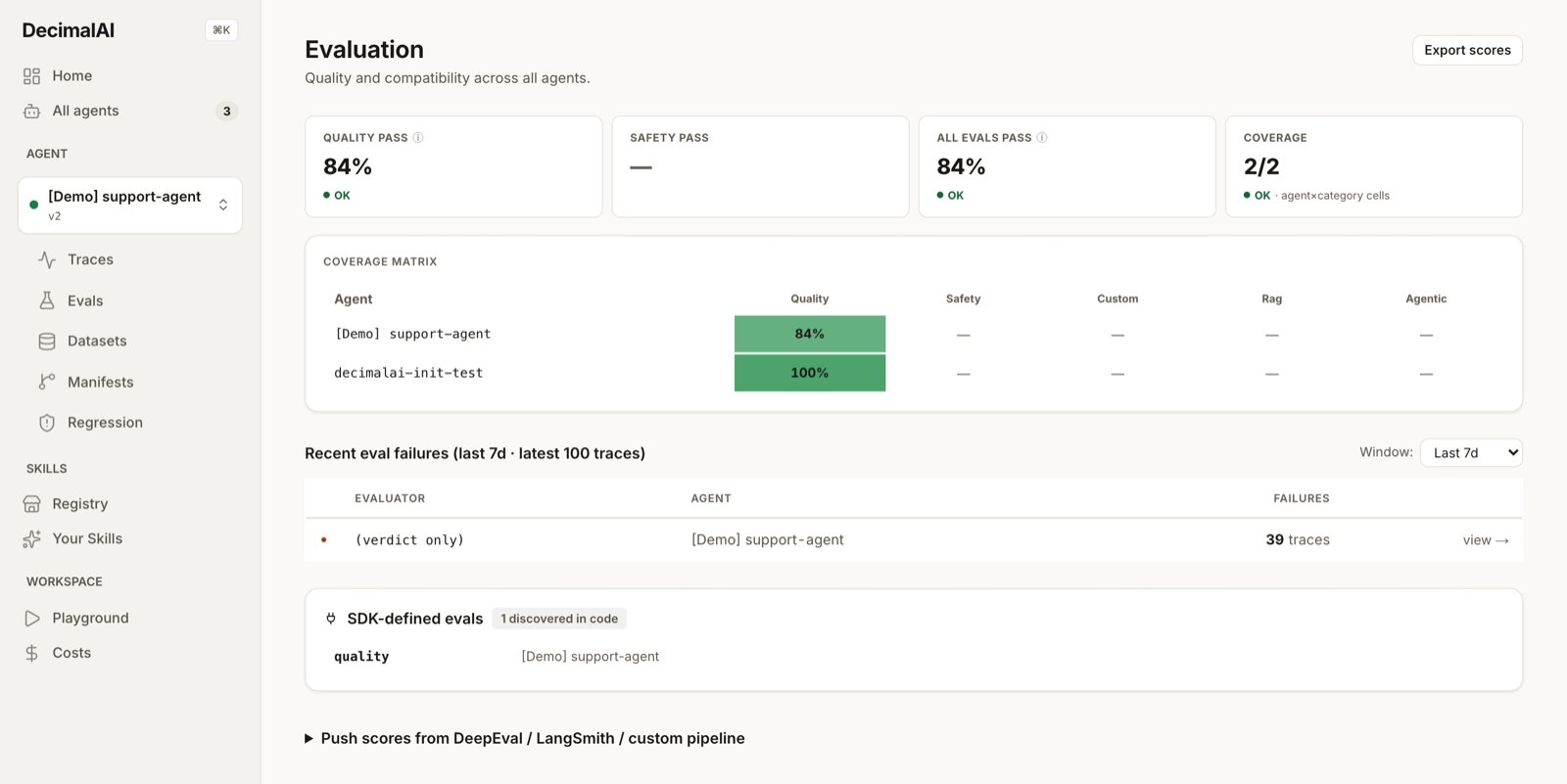
The Evaluation page.
Score sources
An eval score is one check’s result on one trace: itsname, a score between 0 and 1, whether it passed, its source and its category. quality scores ask whether the output is good. compatibility scores ask whether the trace still works with the agent’s current setup.
source says who produced a score:
A trace keeps one score per name and source, so pushing the same pair again updates it.
GET /api/v1/traces/{id}/eval-breakdown, or decimalai.get_eval_breakdown(trace_id), returns a trace’s scores by source (source_groups), with eval_verdict, quality_avg, compat_avg and decision_reasons. The score routes are on Common endpoints.
Verdicts
Scores add up to a verdict on each trace. A trace can carry two, on separate axes:- The eval verdict, pass / fail / review: is this output good? A trace with none yet is shown as Unevaluated.
- The training verdict, keep / repair / replay / drop: what to do with this trace as training data.
So a trace arriving with five passing scores and one failing score gets review, or fail if their average is below 0.4. The five built-in checks don’t set a verdict as a trace arrives, and later they count toward the average only when the trace has no other score, so they can’t outvote a real grade.
The training verdict takes the first of these that matches:
- A compatibility score at 0 or below: drop
- A compatibility score below 0.2: replay
- A quality average below 0.4: drop
- A compatibility score below 0.5: repair
- Anything else: keep
POST /api/v1/traces/{id}/decision works out a trace’s training verdict from its scores and saves it as compat_status. POST /api/v1/traces/batch-decision does the same for trace_ids or every trace of a manifest_id, and runs nothing again. To set one by hand, PATCH /api/v1/traces/{id}/compatibility takes target_manifest_id and override_verdict.
Verdicts feed Datasets, where allowed_verdicts limits a dataset to traces with given verdicts (for example ["keep"] or ["pass"]), and the pass rates and failure lists on the dashboard.
Batch evaluation
Run evaluators across traces that already exist. This works on any framework’s traces:External score import
Push scores from other tools (DeepEval, LangSmith, your own pipeline). They appear beside built-in scores and feed the same verdicts.SDK convenience methods
decimalai.push_deepeval_results() and decimalai.push_langsmith_scores() turn those tools’ results into scores: see External Integration Helpers.
REST API
source is required and applies to the whole batch. The names deepeval, langsmith, braintrust and ragas are reserved and rejected with a 422 here: use custom, or a name of your own like my-pipeline. Without passed, a score passes at 0.5 or above.
LangSmith scores
There is no inbound webhook to point LangSmith at. Callpush_langsmith_scores() once its online eval run finishes. Each key becomes the metric name and comment the reason.
Next Steps
5. Measure it
Eight cases, four checks, two comparisons, on the tutorial’s agent.
SDK reference
Every function here, argument by argument.