

See it first — 2 minutes, no waiting for your own data
The impact report and the skills leaderboard are most convincing on real data — so both ship with a one-command sandbox that seeds a realistic agent and trace corpus into your workspace. See the payoff before you instrument anything.For engineers
Catch regressions before they ship.Seeds a v1→v2 agent change and links you straight to the impact report — which production traces the change would break, which may behave differently, and which are unaffected.
For prompt engineers
Find skills that actually work.Seeds three skills with real, varied effectiveness and links you to the ranked registry — per-model pass rates and cross-org activation, not download counts.
Here for skills instead?
The rest of this page wires up the regression capability — what most teams start with. The skills workflow is a separate, shorter track (no GitHub Action needed):1
Browse the registry
Find skills ranked by SkillScore in the public registry — no signup.
2
Try a skill with no account
skills pull is fully anonymous — no API key, no signup:playwright-cli’s SKILL.md (plus its eval.yaml test suite) to disk and prints its scorecard — the Install a Skill tutorial walks this exact skill end-to-end. Your runtime auto-discovers it from there; the whole keyless route is in Use skills without the SDK.3
Prove one helps
A/B-benchmark a skill with
skillevaluation (pip install "skillevaluation[runner]") to measure its lift on your own cases.4
Install it
Fork it into your workspace and write it to disk with
router.install(...) — see the Skills guide.Wire DecimalAI to your own agent
You’ll do five things in this guide:1
Install the SDK
1 minute.
2
Send your first trace with decimalai init
1 minute.
3
View your first trace in the dashboard
1 minute.
4
Instrument your agent, so the traces come from real runs
3 minutes.
5
Add the GitHub Action so every PR gets a manifest impact report
5 minutes.
Run this in Colab
Run the SDK portion interactively — no local setup required.
1. Install the SDK
pip install "decimalai[langchain]" — shown per-framework in step 4.
Checkpoint:
decimalai --version prints a version number. If the demo command is missing, you’re on Python < 3.10 and pip silently installed an outdated release.2. Send Your First Trace
One command puts a trace in your workspace — no agent code, nothing instrumented yet. It needs a DecimalAI API key — and you already have one. Signing up mints a default key for you automatically, and the first time the app loads after signup it shows a one-time green banner, “Your SDK API key is ready”, with the plaintext key and a Copy key button. The banner follows your session, so it appears on whichever page you land on, not just the home page. Copy the key there and put it inDECIMAL_API_KEY:
POST /api-keys endpoint can mint
those too, but it authenticates with an existing key, so it can’t be your very
first one.
Then run:
Checkpoint: A ✗ takes one of three shapes, and each names its own fix.No key found — nothing in Invalid key — the server answered and rejected it (wrong, truncated, expired, or revoked). Regenerate it at Settings → API keys:Network problem — DNS failure, connection refused, or timeout. The server never answered, so the key may be fine — check Any other HTTP status prints
decimalai init prints all three green checks:DECIMAL_API_KEY or --api-key:The CLI still prints the old label. The tab is now called API keys and has
its own URL: app.decimal.ai/settings/api-keys.
--base-url and your connectivity:✗ Server returned HTTP <status> — the base URL answered but isn’t a DecimalAI backend. A DecimalAI bare auto-init failed warning above the checks is the import-time auto-init hitting the same problem the ✗ line diagnoses; fix the ✗ and it goes away.3. View Your Traces
Open the Traces page in the dashboard. Your first trace should appear within seconds. Each trace is auto-tagged with the of the agent that produced it — this is what powers the regression check in step 5.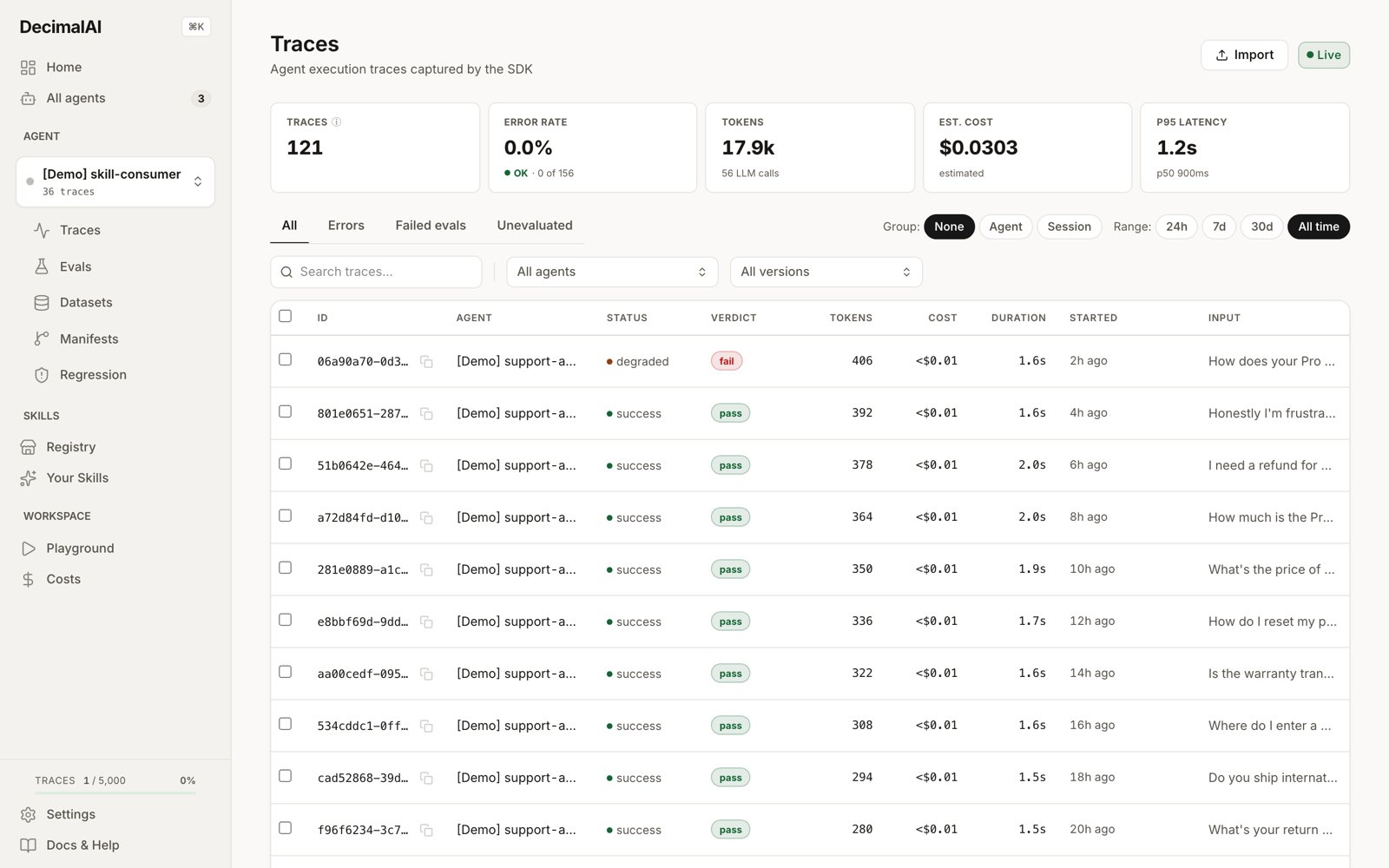
The Traces page, filterable by agent and by manifest version. Shown here after decimalai init plus the two decimalai demo seeds.
Checkpoint: the Traces page shows a row for the trace
decimalai init just sent. Nothing after 30 seconds? Work through the silent no-ops below.4. Instrument Your Agent
That trace came fromdecimalai init, not from your agent. This step is what makes the traces real — one row per actual run, instead of a single test ping.
- No framework
- LangChain
- OpenAI Agents
- Claude Agent SDK
- LlamaIndex
- CrewAI
- Environment Variables
Calling
openai / anthropic / google.genai directly, no agent framework in between? This is the shortest path — and it gets full skill routing:build_prompt_fragment stamps the routing decision and the offered skill names onto the active trace automatically — no extra logging calls. On a network failure it returns ("", None) so prompt assembly never blocks.Prefer zero manual logging?
decimalai.init(openai=True) auto-traces every raw OpenAI SDK call — it drives an OpenInference instrumentor, so install both: pip install "decimalai[openai]" openinference-instrumentation-openai. anthropic=True / google=True work the same way via openinference-instrumentation-anthropic / openinference-instrumentation-google-genai (no extra for those — install the instrumentor package directly). Don’t combine a provider flag with a framework flag that already traces the same provider.On these raw rails, wrap each run in agent_run() so a multi-call tool loop lands in one trace instead of one trace per call — the instrumentor can’t see a run boundary you haven’t declared.Auto-detection depth varies by framework. LangChain and OpenAI Agents (with explicit
instrument(agent=...)) extract full tool schemas; LlamaIndex / CrewAI extract tool names only. See the capability matrix before deciding which integration to commit to. AutoGen / AG2 is not an integration: init(autogen=True) installs the generic exporter and warns — see Generic OpenTelemetry.Checkpoint: run your agent once. Startup logs show
DecimalAI SDK initialized: base_url=https://api.decimal.ai ... with no auto-init failed or not installed warnings. Traces flush in the background and at process exit, and the Traces page shows a row for your run, tagged with a manifest hash, and the input/output you sent. Nothing after 30 seconds? Work through the silent no-ops below — the most common cause is an integration flag whose package isn’t installed.5. Add the Regression Check to your PRs (recommended)
Now wire DecimalAI into your CI so every PR gets a manifest impact report. This is the most-used capability for engineering teams.What this step assumes, honestly:
- An importable agent factory. The CI script imports and calls one function that constructs your agent. If construction is spread across a script, extract a
build_agent()first. - A baseline builds on the first run. The Action’s first run finds no baseline manifest, records your current manifest as the baseline, and exits green — real diffs start on your second PR.
- Impact counts come from your ingested traces. A workspace that just finished step 4 has a handful of traces, so early reports will honestly say few or zero traces are affected. The report earns its weight over days as production tracing accumulates volume.
scripts/init_for_decimal.py that calls your agent factory, a .github/workflows/decimal.yml that runs it under DECIMALAI_MODE=manifest_only, and your DECIMAL_API_KEY in GitHub Secrets. Here’s what runs on every PR:
1. Add scripts/init_for_decimal.py — it calls your existing agent factory, then registers the manifest as the PR’s candidate and writes its ID where the Action’s next step will look for it. In manifest_only mode the SDK reads tools, prompts, and models from the runtime objects, without any LLM calls:
scripts/init_for_decimal.py
chain= and pass the components yourself — tools=[...], prompts={...}, models={...} — the same arguments register_manifest() takes. Without one or the other, the run registers an empty manifest.
2. Add .github/workflows/decimal.yml:
.github/workflows/decimal.yml
api-key, agent-name and the manifest step and the Action runs in fixture mode: it renders a sample report (the seeded demo agent) and posts the same comment, labelled as sample data, with no key and no signup.
3. Add the DECIMAL_API_KEY secret in Settings → Secrets and variables → Actions → New repository secret, with the value from Settings → API keys in DecimalAI.
That’s the whole setup. Once a baseline exists and traces have accumulated, each PR gets a comment like this within ~30 seconds:
Checkpoint: open a trivial PR. The
Agent Regression Check check runs green, and the PR gets a comment. On the very first run the comment says “First run for this agent. Recorded the current manifest as the baseline.” — that’s the expected day-one state, not a failure. Impact counts like the example above appear from the second PR onward, sized by how many traces you’ve ingested.If something looks wrong: the six silent no-ops
The SDK is deliberately fail-open: a misconfiguration degrades quietly instead of crashing your agent. These are the six places that bites, in the order people hit them.1. A registry skill is never offered to your agent
1. A registry skill is never offered to your agent
Browsing or previewing a skill on the public registry doesn’t make it routable — you have to adopt it into your org first. Either way works — Install (the Install button, or
router.use("name") in the SDK) creates a linked pointer that tracks the author’s updates, and Fork (the Fork a copy button, or router.fork("name"), or router.install("name") to also write it to disk) creates an editable copy you own. The Skill Router offers both. If you use per-agent assignments, also assign it to the requesting agent. Until you install or fork it, the skill never appears in your agent’s menu, with no warning anywhere.3. The load_skill tool never appears
3. The load_skill tool never appears
The on-demand body loader is opt-in: pass
enable_skill_loader=True to instrument() on the openai_agents or pydantic_ai adapters. On the anthropic adapter there is no tool loop — enable_skill_loader=True there injects the skill menu into system (the offered rung only); full bodies are injected by default once the loader is on (0.12.0+; init(inject_skill_body=False) turns that off), and note enable_load_skill_tool is accepted but dormant. Kill-switch: init(load_skill_tool=False) or DECIMALAI_LOAD_SKILL_TOOL=0.4. An integration flag whose package is missing
4. An integration flag whose package is missing
decimalai.init(langchain=True) (and every other framework flag) logs a warning and continues untraced when the framework package isn’t importable — your agent runs, nothing is recorded. The same applies to DECIMAL_AUTO_TRACE (auto-init warns and skips) and to the raw-provider flags (openai=True etc.), which soft-skip when the matching OpenInference instrumentor is absent. Fix: for a framework flag, install the matching extra, e.g. pip install "decimalai[langchain]"; for a raw-provider flag, install the instrumentor package the startup warning names, e.g. pip install openinference-instrumentation-openai (the [openai] extra covers only the provider SDK, not the instrumentor). Then re-check startup logs.5. Skill injection skips callable instructions and prebuilt prompts
5. Skill injection skips callable instructions and prebuilt prompts
Adapters only inject skills into prompt shapes they can safely rewrite. On
openai_agents, an agent whose instructions is a user-supplied callable is left untouched; on langchain, a prebuilt PromptValue (or any unrecognized prompt shape) passes through unchanged. The agent runs normally — with zero skills injected and no error raised.6. The impact report says 0 traces (or 'first run')
6. The impact report says 0 traces (or 'first run')
The regression check needs two things before it can say anything real: a baseline manifest (recorded automatically on the Action’s first run, or by
decimalai.init() running in production) and ingested traces to measure blast radius against. A fresh workspace legitimately reports “first run — no baseline” and then near-zero affected traces. That’s honesty, not breakage — reports gain weight over days as production trace volume accumulates.Next Steps
Regression Check Guide
Full configuration, troubleshooting, and severity tuning for the GitHub Action.
Manifests Guide
What manifests capture, how diffs work, and the compatibility policy model.
Concepts
How traces, manifests, evals, and datasets connect.
Training Pipeline
End-to-end: trace → evaluate → fine-tune.